


Noble Edition App-Controlled Rose Suction Toy
Noble Edition App-Controlled Rose Suction Toy
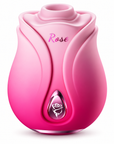
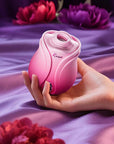
The Rose Toy Noble Edition pairs a rose-shaped suction design with Joyhub app control and a magnetic charging dock. Its gradient finish gives the body a distinctive appearance, while 10 stimulation modes offer a choice of patterns for focused external use. This model is suited to shoppers who want to explore connected controls alongside a compact personal device.
The app is an additional way to interact with the device. Check the instructions supplied with your unit for the correct Joyhub download link, supported phone requirements and pairing process before getting started. Availability of individual app features can depend on your device, app version and connection.

Features to compare
- 10 suction modes: Explore different settings at your own pace. Gentle placement and small changes in angle can help you find a comfortable sensation.
- Joyhub app control: The published product details describe app-based control, custom rhythms and remote interaction. Follow the app and device instructions to see which options are available with your unit.
- Gradient finish: The color transition distinguishes Noble Edition visually from a single-color rose toy. Refer to the product images for the appearance of this listing.
- Magnetic charging dock: Position the device on its charging dock as directed in the manual. Keep the charging surfaces and power connection dry.
- Published IPX7 rating: Follow the supplied water-exposure limits and care instructions. The rating does not apply to the charging dock or power equipment.
Product details
| Model | Rose Toy Noble Edition |
|---|---|
| Design | Rose-shaped external suction toy |
| Modes | 10 stimulation modes |
| Connected control | Joyhub app |
| Finish | Gradient appearance |
| Charging | Magnetic charging dock |
| Published water-resistance rating | IPX7 for the device; follow the manual |
Confirmed dimensions, battery capacity, charging duration and runtime are not provided in the published product details. Consult the instructions supplied with your device rather than using specifications from another rose model.
Joyhub App Setup and Connection Checks
Decide which controls you want to use before beginning. On-device operation and phone-based features are different parts of the experience: the physical control stays within reach, while connected options depend on a compatible phone and the app. Learn the device’s local stop command before trying any shared control.
- Read the device instructions and use their official download link or QR code to locate the correct Joyhub app.
- Check the app's current compatibility requirements for your phone. Charge the device as directed before pairing.
- Follow the manual's power-on and pairing procedure. Keep the phone and device nearby during initial setup.
- Confirm that the connected controls respond while the device is away from the body. Learn how to stop the device before using custom patterns or remote features.
- If inviting a partner to use remote controls, follow the app's sharing process and agree on how to pause or end the session. Keep local controls accessible.
The listing does not specify a guaranteed wireless range, supported operating-system versions or which app functions require an account or network connection. Check these details in the app before relying on a particular connected feature.
If the App Does Not Connect
Start with the basics: check that the device is charged, switched on and in the pairing state described in its manual. Keep the phone close during setup and confirm you selected the correct device inside Joyhub. Review the connection permissions requested by the app and retry its documented pairing process. A device appearing in a phone’s settings alone does not confirm that the app has connected successfully.
If local controls work but a connected function does not, check the app’s compatibility and network requirements for that function. Do not assume that every screenshot or feature from another seller applies to your app version. For help, send RoseZoe support your model name, phone operating-system version and a description of the problem; do not send passwords or private conversations.
Shape, Placement and Everyday Handling

Clean the contact surface according to the manual before use. Hold the rose-shaped body and position the opening gently for external clitoral stimulation; do not insert the body or force a tight seal. Begin with a gentle setting and make small position adjustments before changing modes. Stop if the sensation is uncomfortable.
If using lubricant, confirm material compatibility in the manual and choose a suitable water-based option. Keep fingers, hair and loose material away from the opening and moving components. Individual preferences and sensations vary.
Cleaning and Storage
Switch off after use and clean with products approved for the device's surface. Avoid harsh solvents, abrasive tools and boiling. Follow the manual's water-exposure limits even with the published IPX7 rating. Dry the device completely before returning it to the dock.
Magnetic Charging Dock
Noble Edition uses a magnetic charging dock. Set the dock on a stable, dry surface and position the device as shown in the included instructions. Check the indicated charging status before leaving it to charge. Do not force the device onto the base or substitute a charger merely because it is also advertised for a rose-shaped toy.
If charging does not begin, disconnect the power first, inspect the contact surfaces for moisture or debris, and reseat the device according to the manual. Use the specified cable and power source. Keep the dock dry, avoid operating the device while connected to power, and stop using damaged charging equipment. A specific charging duration, battery capacity and runtime are not confirmed here; the instructions supplied with your unit take priority.
Once clean and fully dry, store the device away from direct sunlight, sharp objects and heavy items that could deform the opening. Keep the compatible dock together with the device so it is easy to identify.
Frequently asked questions
Which app controls Noble Edition?
The published product details name Joyhub. Use the download instructions supplied with the device to identify the correct app and pairing procedure.
Does every app feature work on every phone?
Compatibility and available functions can vary with the phone, app version and connection. Check the current requirements and the device instructions before relying on remote control or custom rhythms.
How long does a full charge last?
A specific runtime is not provided in this listing. Follow the charging guidance supplied with your device.
Is the charging base waterproof too?
The published IPX7 rating is for the device, not the dock or power equipment. Keep the base and electrical connections dry, and follow the device manual’s water-exposure limits.
Are the ten modes ten separate motors?
No. The mode count describes selectable settings. It does not establish a motor count, measured suction output or a guaranteed response for every person.
Compare Other Rose Toy Designs
Noble Edition focuses on a compact, handheld suction design with phone-based control. For a different combination of contact types, compare the 3-in-1 rose tongue and suction vibrator. Browse the RoseZoe rose toy collection to compare each model’s controls, opening shape and charging method before choosing.
30-Day Returns and Customer Support
Read the RoseZoe 30-day return policy before opening sealed packaging. Eligibility and hygiene conditions apply; this is not an unrestricted trial. For a damaged, incorrect or faulty item, email support@rosezoe.com with your order number and a description of the issue.
For adults aged 18 or older who also meet the legal age of adulthood where they live. Read the supplied instructions before use and stop if discomfort occurs.
Orders ship in discreet, plain packaging with no product description on the outside.
Most orders are processed within 1-2 business days. Typical delivery windows are 7-10 business days for North America, the EU and the UK, and 10-15 business days for Oceania and Asia.
You will receive tracking details as soon as your order leaves our warehouse.
Shop with confidence. Every Rosezoe product includes a 12-month warranty for manufacturer defects.
If your item arrives damaged or does not work as expected, contact our support team and we will help with troubleshooting or replacement.
Eligible return requests must be submitted within 30 days of delivery. Items must meet the eligibility conditions and exclusions in our Refund Policy; intimate products generally must be unused, unopened and in their original packaging.
For damaged, defective or incorrect items, contact support@rosezoe.com with your order number so we can review the issue.
Return requests and support conversations are handled discreetly.
Find the right rose toy guide
Compare models, get started, or find practical help for your RoseZoe product.